
Simple trick to hide IDA debugger
Quite often IDA users ask for a plugin or feature to hide the debugger
from the application. In fact there are many anti-debugging tricks and
each of them requires an appropriate reaction from the debugger, let's
start with something simple: we will make the IsDebuggerPresent
function call always return zero.
When the debugger is active, we will go to the disassembly of the
IsDebuggerPresent function. We will use the 'goto to the specified
address' command for that. Unfortunately, the current version of IDA
does not display imported names in the name list and we will need to
type in the function name in the input field manually:
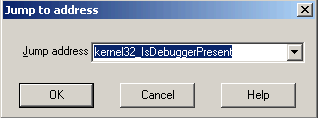
Please note how we form the address: the
dll name followed by an underscore followed by the function name. We
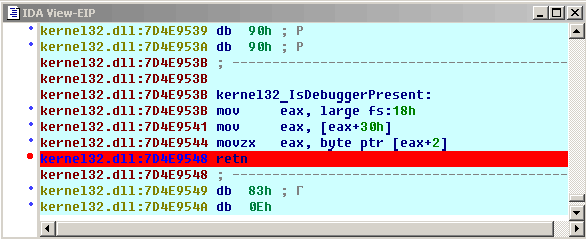
put a breakpoint at the end of the function so we will have a chance
to intercept the execution and modify the result:
Since we don't want to suspend the program and modify the result
manually each time IsDebuggerPresent is called, we will automate it.
We will use breakpont conditions. The breakpoint condition field
can be used to determine whether a breakpoint should be triggered or
not. The condition is an IDC expression. If the expression evaluates
to zero, the breakpoint will not fire. Since IDA evaluates the
expression in order to determine its value, we can use it for the side
effects, like modifying register values, memory, or anything else you
can think of. We modify the breakpoint attributes the following way
(right click, Edit breakpoint):
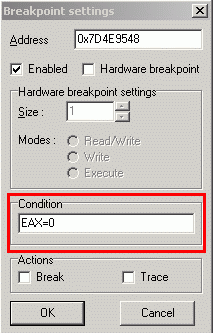
We specified the condition as "EAX=0". It is not a comparison, it is an
assignment. When IDA evaluates it, EAX will become zero as a side
effect, exactly what we want it to be. We have also to clear the
'break' attribute since we don't want to suspend the application.
With a breakpoint defined like this, our debugger is immune against
the IsDebuggerPresent call. It may sound too simple and you may ask
"what about not-so-childish anti-debugging tricks?" Hold on, we will
develop this topic more.

Comments
great blog, keep it up, your audience will find you
Posted by: MK | November 10, 2005 12:46 PM
Really nice blog!!!! Keep writing this stuff ;)
Posted by: Segad0r | November 12, 2005 06:02 AM
I'm glad to see your blog!
About the trick: the isDebuggerPresent function is returning a flag in the PEB (Process environment block).
The antidebugging program can read the flag from the PEB without calling the function. An IDC script could be used to overwrite the flag in the PEB with 0, isn't it possible?
Posted by: juanex | November 12, 2005 07:30 PM
IDC will not be enough, a plugin will be.
The problem with IDC is that it can not resolve memory references like fs:xxx and this kind of reference is needed to find the TEB block of the process.
A plugin can easily overwrite this value and put zero there. Are you sure that it doesn't pose any problems in general? I've heard that there might be unwanted consequences in some circumstances but nothing concrete.
Posted by: ilfak | November 13, 2005 05:57 AM
If memory serves, the trick that Nicolas taught me was patchbyte [EBX+2], 0 when you very first start the program. it seems that EBX points to the PEB when a program is first executed.
Posted by: Ryan Russell | November 16, 2005 01:00 AM
Nice trick, thank you!
I wish we could automate it without plugins... If IDA had hookable events in IDC, it could even be configured in ida.idc :)
Posted by: ilfak | November 16, 2005 04:37 AM
this is so dummy ;), i mean lame
Posted by: bw | November 19, 2005 06:28 PM
I'm glad that you find it dummy since it means that absolutely everyone will understand it ;)
See the continuation - this simple trick is used to handle today's widespread viruses. And there will be more...
Posted by: ilfak | November 19, 2005 06:49 PM
with this trick it's still possible to detect r3 debugger ("rootkit revealer" way), compare raw PEB value with value returned by IsDebuggerPresent, it should be the same right
PS. does ida's debugger uses debug thunks on win9x?
Posted by: bw | February 9, 2006 10:43 AM