



Scripting with IDA Pro has always been a very handy feature, not only when used in scripts but also in expressions, breakpoint conditions, form fields, etc…
In IDA Pro 5.6 we improved the IDC language and made it more convenient to use by adding objects, exceptions, support for strings with embedded zeroes, string slicing and references.
General language improvements
Local variables can now be declared and initialized anywhere within a function:
static func1()
{
  Message("Hello world\n");
  auto s = AskStr("Enter new name", "noname00");
  // ...
  auto i = 0;
  // ....
}
Global variables can be declared (in a function or in the global scope) with the extern keyword:
// Global scope
extern g_count; // Global variables cannot be initialized during declaration
static main()
{
  extern g_another_var;
  g_another_var = 123;
  g_count = 1;
}
Functions can be passed around and used as callbacks:
static my_func(a,b)
{
  Message("a=%d, b=%d\n", a, b);
}
static main()
{
  auto f = my_func;
  f(1, 2);
}
Strings can now contain the zero character thus allowing you to use IDC strings like buffers. This is extremely useful when used with Appcall to call functions that expect buffers:
auto s = "\x83\xF9\x00\x74\x10";
Message("len=%d\n", strlen(s));
// Construct a buffer with strfill()
s = strfill('!', 100);
Message("len=%d\n", strlen(s));
Strings can be easily manipulated with slices (Python style):
#define QASSERT(x) if (!(x)) { Warning("ASSERT: " #x); }
auto x = "abcdefgh";
// get string slice
QASSERT(x[1] == "b");
QASSERT(x[2:] == "cdefgh");
QASSERT(x[:3] == "abc");
QASSERT(x[4:6] == "ef");
// set string slice
x[0]   = "A";           QASSERT(x == "Abcdefgh");
x[1:3] = "BC";          QASSERT(x == "ABCdefgh");
// delete part of a string
x[4:5] = "";            QASSERT(x == "ABCdfgh");
// patch part of the string with numbers
x[0:4] = 0x11223344;
Strings and numbers are always passed by value in IDC, but now it is possible to pass variables by reference (using the ampersand operator):
static incr(a)
{
  a++;
}
static main()
{
  auto i = 1;
  incr(&i);
  Message("i=%d\n", i);
}
Note that objects (described below) are always passed by reference.
IDC classes
Classes can now be declared in IDC. All classes derive from the built-in base class object:
auto o = object();
o.ea = here;
o.flag = 0;
User objects can be defined with the class keyword:
class testclass
{
  testclass(name)
  {
    Message("constructing: %s\n", name);
    this.name = name;
  }
  ~testclass()
  {
    Message("destructing: %s\n", this.name);
  }
  set_name(n)
  {
    Message("testclass.set_name -> old=%s new=%s\n", this.name, n);
    this.name = n;
  }
  get_name()
  {
    return this.name;
  }
}
static f1(n)
{
  auto o1 = testclass("object in f1()");
  o1.set_name(n);
}
static main()
{
  auto o2 = testclass("object2 in main()");
  Message("calling f1()\n");
  f1("new object1 name");
  Message("returned from f1()\n");
}
Which outputs the following when executed:
constructing: object2 in main()
calling f1()
constructing: object in f1()
testclass.set_name -> old=object in f1() new=new object1 name
destructing: new object1 name
returned from f1()
destructing: object2 in main()
To enumerate all the attributes in an object:
auto attr_name;
auto o = object();
o.attr1 = "value1";
o.attr2 = "value2";
for ( attr_name=firstattr(o); attr_name != 0; attr_name=nextattr(o, attr_name) )
  Message("->%s: %s\n", attr_name, getattr(o, attr_name));
If object attribute names are numbers then they can be accessed with the subscript operator:
class list
{
  list()
  {
    this.__count = 0;
  }
  size()
  {
    return this.__count;
  }
  add(e)
  {
    this[this.__count++] = e;
  }
}
static main()
{
  auto a = list();
  a.add("hello");
  a.add("world");
  a.add(5);
  auto i;
  for (i=a.size()-1;i>=0;i--)
    print(a[i]);
}
IDC classes also support inheritance:
class testclass_extender: testclass
{
  testclass_extender(id): testclass('asdf')
  {
    this.id = id;
  }
  // Override a method and then call the base version
  set_name(n)
  {
    Message("testclass_extender-> %s\n", n);
    testclass::set_name(this, n);
  }
}
They also support getattr/setattr hooking like in Python:
class attr_hook
{
  attr_hook()
  {
    this.id = 1;
  }
  // setattr will trigger for every attribute assignment
  __setattr__(attr, value)
  {
    Message("setattr: %s->", attr);
    print(value);
    setattr(this, attr, value);
  }
  // getattr will only trigger for non-existing attributes
  __getattr__(attr)
  {
    Message("getattr: '%s'\n", attr);
    if ( attr == "magic" )
      return 0x5f8103;
    // Ofcourse this will cause an exception since
    // we try to fetch a non-existing attribute
    return getattr(this, attr);
  }
}
Exceptions
Normally when a runtime error occurs, the script will abort and the interpret will display the runtime error message. With the use of exception handling, one can catch runtime errors:
static test_exceptions()
{
  // variable to hold the exception information
  auto e;
  try
  {
    auto a = object();
    // Try to read an invalid attribute:
    Message("a.name=%s\n", a.name);
  }
  catch ( e )
  {
    Message("Exception occured. Exception dump follows:\n");
    print(e);
  }
}
Resulting in the following output:
Executing function 'main'...
Exception occured. Exception dump follows:
object
description: "No such attribute: object.name"
file: "C:\\Temp\\ida56.idc"
func: "test_exceptions"
line:          91.       5Bh
pc:          31.       1Fh
qerrno:        1538.      602h
IDC debugging tips
Last but not least, we would like to mention two useful IDC debugging tips.
The first (we used it previously) involves the print() function:
// Print variables in the message window
// This function print text representation of all its arguments to the output window.
// This function can be used to debug IDC scripts
void    print           (...);
This function can be very handy when used to print a variable of any type especially objects and all their nested attributes.
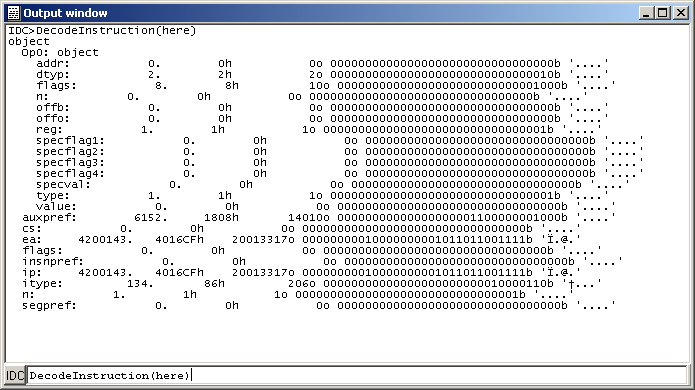
And the second tip involves the use of the command window to evaluate commands. The trick is to type an IDC statement without a terminating semicolon.
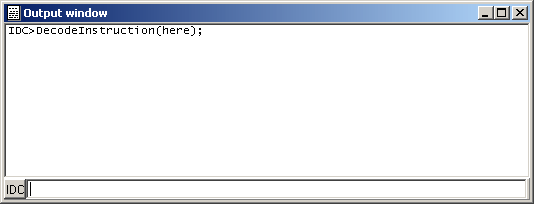
To illustrate, we will first use the DecodeInstruction() with a semicolon:
And now the same thing, repeated, without a semicolon would automatically invoke the print() against the returned result, thus:
Although we said two debugging tips, but here’s the third: you can use the peroid key (“.”) to jump from an IDA View to the command window and the escape key to return to the IDA View.
The script snippets used in this blog entry can be downloaded from here.